





We are proud to announce the release of new user management enhancements. Now, you have even more control over how your team members access and use ChartRequest, our release of information software.
Whether you have a team of 1 or 1,000, you can rest easy knowing that you’ve safeguarded Patient Health Information and streamlined the release of information process across your organization. Check out the details below:
Advanced User Roles & Permissions Sets
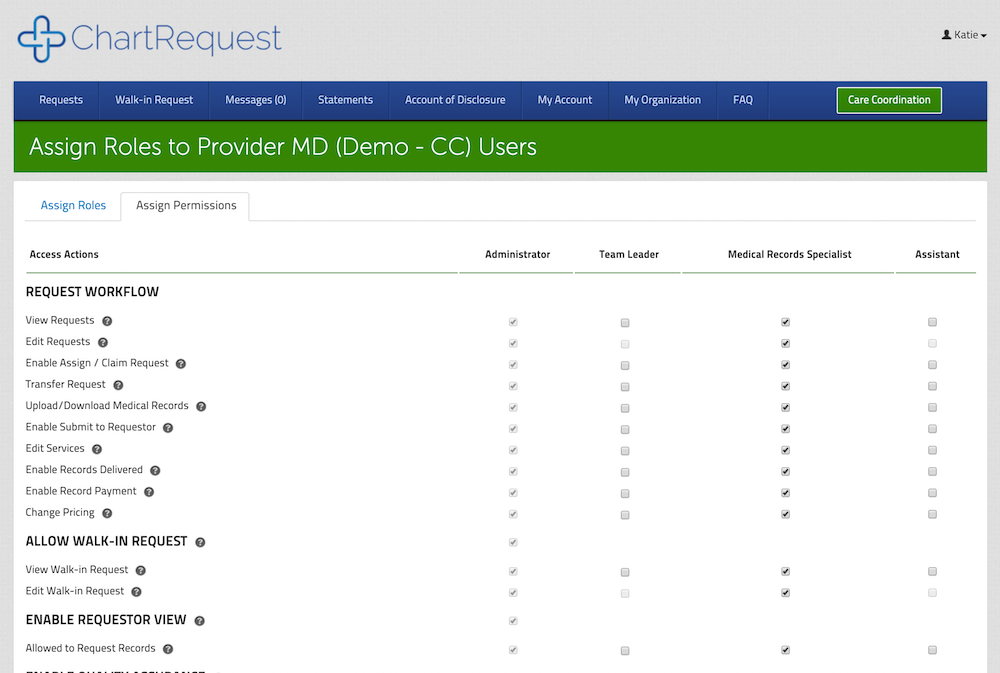
We’ve added advanced user roles and built-in permission sets that you can control from your organization dashboard. So now, you determine which users can:
- Edit requests
- Invite or approve new users for your organization
- Process QA requests
- And lots more!
Looking for a release of information solution for your organization?
Enterprise-Level SAML Authentication
SAML is a single sign-on (SSO) format that enables seamless authentication between your organization and ChartRequest. As of now, you can configure SAML 2.0 with Active Directory Federation Services or G Suite, and more options are on the way.
Curious about how SAML authentication works?
Learn more about SAML here.
Simplified Team Member Onboarding Workflow
Onboard new ChartRequest users via email invitation. If an employee misses the first invite to join your organization, no problem! You can resend the invitation anytime.
In addition, you can view & confirm or reject new requests to join your organization. And if you ever need to deactivate an existing user, you have that capability.

How do I access these features?
If you already use ChartRequest for your organization, you’ll see the new roles, permissions, and onboarding user management options already integrated in your account. For SAML authentication, please email us at [email protected] for more details on the configuration process.
If you haven’t started using ChartRequest as your release of information software yet, there’s no better time to get started. You can learn more about our platform here, or schedule a demo with one of our ChartRequest experts.